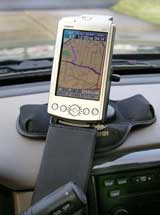
November, 2004
by: J. Chartwell
Introduction:
The iQue 3600® is the first PDA to include integrated GPS technology. The integrated software not only allows you to look up appointments or contacts, but also locates and routes you to them with voice-guidance commands. The Que technology delivers location awareness, electronic mapping, automatic route calculation, turn-by-turn voice guidance, and map data interface to the iQue. Que technology enables you to see where you are, find a street address, know where the next turn is via visual and voice guidance, get back on track when you�ve strayed off course, and navigate efficiently to your desired destination.
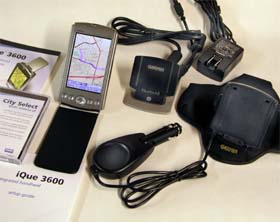
What You Get:
- iQue 3600 organizer with GPS
- Automotive friction mount with integrated charger and speaker
- protective flip cover
- metal stylus
- USB HotSync cradle
- AC power/charging adapter
- Quick start guide
- Installation and application CD-ROM with manual
- MapSource City Select North America v6 CD-ROM
Optional accessories:
- Leather carrying case
- Automotive windshield mount
- Travel kit
- external GPS antennas
- MapSource CD-ROMs
- serial HotSync cradle
- serial HotSync cable
- USB HotSync cable
What It Does:
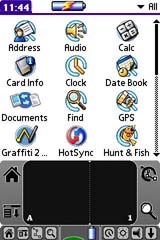
The handheld interface shows all the available applications. One screen shows all applications and you can cycle through each application category. There are four ways to enter data into the handheld: using the on-screen keyboard, using Graffiti 2 (that is where you can use strokes of the stylus to draw letters and numbers), using an external keyboard, or entering or importing data in Palm Desktop software then syncronzing it to the handheld.
Being a PDA, the iQue 3600 does almost everything a standard PDA will do. It has a date book, “to do” list, address book, memo pad, calendar, alarms, SheetToGo, WordToGo, and more.
The handheld can be customized to do the following: display personal information, display the current date and time, shut down after a specific time for battery savings, stay on while in the cradle, control the sound volume, and automatically receive any data beamed to it, among other things.
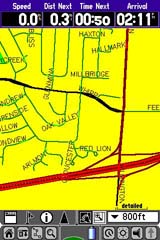
The QueMap application displays a detailed map of the area surrounding your current location. It allows you to pan the map with the stylus as well as view your progress when navigating. Your current location is shown as a solid black arrow. When in the “Track Up” mode, a north reference arrow appears at the top left corner to orient the map. When the Track Log feature is active, your path of movement is indicated by a dotted Track line.
You can use the map to determine your current location, view your progress while moving, locate and navigate to nearby map items, follow a route line when navigating, and highlight and view information about locations on the map.
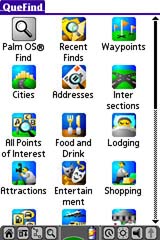
The QueFind Application displays lists of geographic points in the map database and downloaded detailed maps. It allows you to use existing lists of map data items such as waypoints, cities, and points of interest to find desired destinations and navigate to them, find items contained in the map data and the address book, view details about items such as addresses and telephone numbers, and find items to use as a destination for a route.
QueFind will ask you if you want to find by using “Near Current Location,” “By Name,” or “Near Other.” In addition to the Find choices at the right are: Services, Transportation, Emergency and Government, Manmade Places, Water Features, Land Features, Anchorage, Facilities, Fishing Sites, Navaids, Marine Services, Restricted Areas, Wrecks and Obstructs, and Tides.
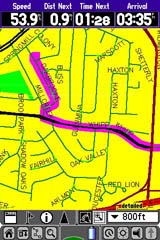
QueRoutes is an application that provides you with a graphic route line plus graphic and voice turn-by-turn directions to a chosen destination. You can select a destination from any of the QueFind application categories, the Address Book, the QueMap application, or a location attached to an entry in the Date Book application. QueRoutes functions primaily as a route management tool once you have selected a destination.
Use the QueRoutes application to recalculate the route to your current destination, add stops or new waypoints to customize your route, save specific routes for use at a later date, set the preferences for routing, and stop and resume navigation of an active route.
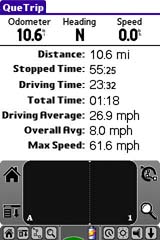
With QueTrip you can:
- View the total distance you have traveled.
- View the direction in which you are traveling.
- View your current speed.
- View the distance you have traveled on this trip.
- View the time when you have not been moving.
- View the time when you have been moving.
- View the total time traveled.
- View your average speed while traveling.
- View your average speed overall.
- View your maximum speed while traveling.
Additional iQue 3600 Applications
- Waypoints – A waypoint is an address book entry with a set location.
- QueTracks – records your path of travel. It can be used to travel back to your point of origin and be saved for later use.
- QueTurns – shows you a list of turn-by-turn directions to a destination.
- QueVoice – allows you to record and store voice files to use as reminders, notations or messages.
- QueAudio – plays MP3 and WAV format files stored on the external card. The iQue handheld is provided with a stereo headset jack for privacy.
- QueClock – displays the current time and other time related features.
- QueSun & Moon – displays information about the sun and moon for any location and time.
- QueHunt & Fish – displays the time intervals for hunting and fishing success for any location and date.
Specifications:
Physical:
Size: 5�H x 2.8�W x .8�D (127 x 72 x 20 cm)
Weight: Appr. 5.2 ounces (162 g)
Display: 3.8″ diagonal (54 x 81 cm), 320 x 480 pixels, 16 bit color display and white LED backlight and touchscreen
Antenna:Flip-up adjustable
Performance:
Receiver: 12 parallel channel WAAS-enabled
Acquisition time: Cold � appr. 45 seconds
Warm – appr. 15 seconds
First time – appr. 5 minutes
Update Rate: 1 second continuous
Position Accuracy: less than 15 meters (49 ft)
less than 3 meters with WAAS
Navigation:
Trip Computer: resettable odometer, timers, average and max. speeds
Routes: 50, with up to 50 points per Route; automatically calculated with turn-by-turn instructions
Tracks: 32, with 500 points per saved track and maximum of 5,000 active track points
Power:
Input: Lithium-ion battery
Battery Life: Up to 30 hours
Internal system:
Operating system: Palm OS� 5.2.1
Embedded capabilities: GPS, MP3 player, voice recorder, infrared communication, and vibrating alarm
Audio hardware: Microphone, speaker, headphone jack
Processor: 200 MHz Motorola DragonBall MXL ARM 9
Internal memory: 32 MB DRAM
Expandable memory: SD/MMC
Standard applications:
Garmin� “Que” apps: MP3, GPS Clock, Address Lookup, Electronic Mapping, Track log, Trip Computer, Automatic Route Generation, and Turn-by-Turn Voice Guidance
Palm OS 5 apps: Address Book, Calculator, Date Book, Memo Pad, and To Do List
Other 3rd-party apps: Astraware Game Pack, Documents To Go by DataViz, powerOne Personal Calculator, StarCaddy, Vindigo, WorldMate, DataViz Mail, and Palm Reader
Moving map features:
Basemap: Built-in routable basemap contains state and country boundaries, lakes, rivers, streams, airports, cities, towns, coastlines, state and interstate highways, local thoroughfares, and secondary roads within metro areas
CD-ROM: Accepts downloadable map detail from Garmin PC-based MapSource� City Select� CD-ROM which provides street-level detail, addresses, listings of nearest restaurants, hotels, ATMs, and more
Price:
Suggested Retail: $589.27 USD (iQue 3600 standard package only)
Mean Price Available on Internet: $515.50 USD (iQue 3600 standard package only)
Suggested Retail: $642.84 USD (Bundle version; includes automotive friction mount with integrated charger and speaker)
Mean Price Available on Internet: $534.50 USD (Bundle version; includes automotive friction mount with integrated charger and speaker)
Practical Use:
To begin the setup, I connect the cradle’s USB connector to the PC and also connect the AC adaptor to the USB cable. After charging the iQue 3600 for 3 hours, I can turn the unit on and follow the on-screen instructions for setup. Next I install the software including the Palm Desktop. The Desktop would come in very handy for viewing and editing the calendar, “to do” list, etc. After the software, I install and unlock the maps. The final step is to select maps for the region for which I intend to travel. The iQue 3600’s memory is 32MB (22MB free), so if you want a larger map area you will need to purchase an SD memory card.
Initializing the GPS receiver took about 5-7 minutes. Subsequent cold starts were about 40-60 seconds. The friction mount held the unit tight to the dash while driving. Voice prompts were adequate – in very loud conditions (high speeds/noisy roads/loud stereo) the speaker may be borderline.
Setting a route was quite easy – I tap “Find” and that brings me to a page with many search categories (see the QueFind screen shot above). Choosing “Food & Drink” calls up a list of all appropriate businesses in the map area. Since this list is likely to be long, I spell out the first few letters of the name of the restaurant and that gets me to the one I want. I tap that one and after a few short moments, a route is calculated for me and I follow the voice prompts. Upon approaching a turn, the voice announces the turn about 2/10ths of a mile ahead, then again at about 400 feet.
Since the iQue 3600 knows the sunrise and sunset times, it automatically switches the screen to a nighttime mode, making viewing easy on the eyes. I was concerned about the time the battery stayed charged being short. A big help on this matter is the fact that the unit shuts down when not in use, then comes back on when necessary, such as when approaching a turn. The iQue 3600 has a “simulate” mode – if you wish you can have it go through all the moves as if you were actually navigating a route. One more nice feature – it will automatically re-calculate a route if you miss a turn or otherwise go off route.
Cons and Pros:
Cons:
- Screen occasionally difficult to see in certain sunlight situations.
- Short battery life between charges.
- No ability to view maps or create routes on the PC
Pros:
- The convenience of a PDA and GPS in one.
- Many ways to customize the operation to fit your preferences.
- Unit has many useful functions.
Conclusion:
Although not cheap, it still is reasonably priced and it seems to be a sturdy little unit. It is somewhat thicker than many PDAs due mainly to the GPS antenna. It would have been nice if Garmin included an SD card. But unless you travel a wide area, the memory in the iQue 3600 may be enough. If you’re looking for a combination GPS and PDA, this is a good choice.
Return to GPS Home.