September, 2004
by: J. Chartwell
Introduction:
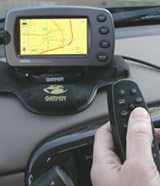
The StreetPilot 2610 has automatic route capability, voice prompts and a large color display at a reasonable price. The touch screen and remote control allow for easy entering and retrieving information. The 2610 also features a large, easy-to-read screen, built-in maps, and everything needed to download additional map detail and look up points of interest and addresses. Select maps and transfer data directly to the unit through a USB connection and onto a standard CompactFlash® memory card. The 2650 has the same features as the 2610 except it includes dead reckoning (see below) capabilities and must be installed by an authorized Garmin installation dealer.
This place often has the best GPS prices…
What You Get:
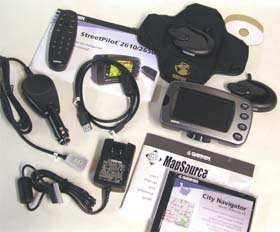
The Garmin StreetPilot 2610 (or 2650) GPS receiver, MapSource City Navigator CD-ROM with Unlock Certificate, CompactFlash Memory Card, Dash Mount, Portable Bean Bag Mount, External Speaker with 12/24-volt Adapter Cable, A/C Power Adapter, PC/USB Interface Cable, Alphanumeric Remote Control (requires 2 AAA batteries not included), Owner’s Manual, Quick Reference Guide, Dead Reckoning Installation Cable (2650 only), and Setup Guide.
Optional accessories: Remote GPS Antenna and antenna mounts, Deluxe Carrying Case, and 128 and 256 MB Compact Flash Memory Cards.
What It Does:
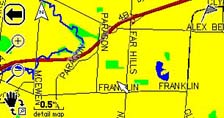
The Map Page is the StreetPilot’s main operating page. This page is the first image you see after the startup screens, and it’s what you view as you navigate to a destination. Many features make up the Map page. Whether you’re navigating a route or simply driving with your StreetPilot turned on, you will see a map that displays your current location as well as surrounding street detail. Additionally, depending on your current driving mode, tabs that appear on the Map page will provide such information as your current speed, your driving direction, and names of upcoming streets. You can look beyond your current postion by panning (moving around the Map page). You can also zoom into locations to view greater street detail or you can zoom out to see what’s ahead on your route.
Trip Information Page
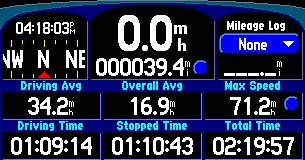
While navigating a route you can access the Trip Information page. If you are making a long trip, you may find the Trip Information page to be very useful. It indicates your current speed and many helpful statistics about your trip. You will want to remember to reset the Trip Computer before beginning a trip. If you make frequent stops, leave the StreetPilot powered on in order to receive satellites. This allows the unit to accurately measure elapsed time during the trip. Note, however, that this might not be possible since some vehicles disconnect power to the cigarette lighter when the ignition is turned off.
The Find Page
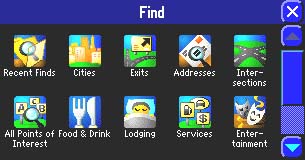
The Find feature is very useful in a number of ways. Most of the locations it’s able to find can be found by name, near other (this means to find a place not near your current location), near here, near [destination], or near map pointer. You can find cities, addresses or intersections, places to eat, sleep, shop, and visit, highway exits, and waypoints. Also available is the ability to measure distance and find “recently found” places. “Recently found” allows you to recall the 30 most recent finds in the memory.
Route Page
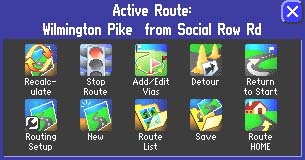
With the versatile “Route” feature you can plan a route to a restaurant or a whole vacation. When you create and activate a route, the following options appear: recalculate, stop or resume route, add/edit vias, detour, return to start, routing setup, new, route list, and save. Also, while creating a route, the “Route Preference” window appears. It asks if you want the route to be calculated by faster time, shorter distance, or off road.
Dead Reckoning (StreetPilot 2650)
Dead reckoning allows you to continue to get navigation guidance even when GPS signals are obscured. To use this feature, a special dead reckoning cable must be connected to your vehicle’s speedometer and backup lights by an authorized Garmin installer. Once installed, your StreetPilot will acknowledge your turns as well as your distance traveled when GPS reception is unavailable. This is a worth-while feature if you are going to be using the unit in an urban area where tall buildings can block the GPS signal.
Specifications:
Physical:
Case: Fully-gasketed, waterproof to one meter for 30 minutes
Size: 3.2”H x 5.6”W x 2.0”D (8.0 x 14.3 x 5.0 cm)
Weight: Appr. 15 ounces (420 g)
Display: 1.7″H x 3.3″W (4.4 x 8.4 cm), 305 x 160 pixels, automotive-grade 8-bit, 256-color LCD with automatic dimming backlight and touchscreen; compatible with polarized sunglasses
User Data Storage: Indefinite – no backup battery required
Map Storage: Compact Flash memory cards; type I and II compatible
Antenna: Built-in patch, MCX-type connector for optional external GPS antenna connection
Performance:
Receiver: 12 parallel channel
Acquisition time: Cold – appr. 45 seconds
Warm – appr. 15 seconds
First time – appr. 2 minutes
Update Rate: 1 second continuous
Position Accuracy: less than 15 meters (49 ft)
less than 3 meters with WAAS
Navigation:
Waypoints: 500 with name and graphic symbol
Track Log: 2000 track log points
Dead Reckoning: (2650 only) Internal angular rate sensor, external speed sensor input, and external reverse light sensor input
Power:
Input: 12/24-volt DC
Usage: 6 watts max. @ 13.8-volt DC
Remote Control: 2 AAA batteries
Price:
Suggested Retail 2610: $1166.55 USD
Mean Price Available on Internet: $859.97 USD
Suggested Retail 2650: $1399.98 USD
Practical Use:
The first thing to do is to insert the setup CD in the PC and follow the steps. The StreetPilot uses a USB cable to connect to the computer. Then the MapSource CDs are used to load maps to the StreetPilot 2610/2650.
In order to get familiar with the unit, the manual guides me through a tutorial that finds and routes me to a nearby restaurant. Once the unit is in place in the vehicle, powered on, and has found its satellites, it displays “ready to navigate.” I press the “Find” key, then touch the “Food & Drink” icon on the on-screen menu. A list of local restaurants appears and I choose the one I want to go to. I touch “Go To” and the unit asks me my route preference: faster time, shorter distance, or off road. After making one of those three choices, the screen displays a map and the voice prompts announce the directions to guide me to my destination. The speaker is controlled by a touch-screen volume control and the voice is very clear and can be made to be loud enough to be heard over any road noise your vehicle can make.
The StreetPilot has a “simulate” mode that allows you to practice with the unit to get familiar with what it does when using routes. Since this mode is used with the GPS navigation off, it can be used in the comfort of your home. “Simulate” is a handy feature, but at one point it got stuck continuously going around in circles on an interstate cloverleaf-type ramp. When using the 2610/2650 in a car, the beanbag mount has sufficient weight and friction to hold the unit securely on the dashboard.
Another handy feature is Off-Route Recalculation. With this, the unit can be set to tell you that it is recalculating whenever you depart from the original instructed route. It can also be set to tell you to either make a U-turn or continue the current direction and take the next through street to get back to the original route. Choosing “faster time” when routing is not always faster. On one occasion the unit could have chosen a faster route by going out of the way. Another time it took me way out of the way to attempt to save time by using interstate highways. “Faster time” should be used knowing the unit will not always do so, but using “shorter distance” will almost guarantee you actually will get the shorter distance.
Cons and Pros:
Cons:
- A few minor quirks as mentioned above.
Pros:
- Many options for lots of flexibility.
- Unit comes with a lot of accessories.
- The manual is very thorough.
Conclusion:
I was impressed with all the various things the StreetPilot 2610/2650 will do. Accuracy doesn’t seem to be a problem and the screen performs well, even in bright sunlight. This is worth the money and it is appropriate whether it is your first GPS or if you’re a seasoned GPS user. Keep in mind for security reasons you’ll probably want to put it out of sight when leaving your vehicle.
This place often has the best GPS prices…
Return to GPS Home.