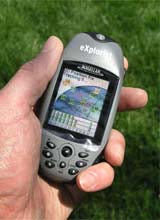
Introduction:
With a high-speed USB data port and unlimited data storage capacity via secure digital (SD) card expandability, you can add detailed street maps, topo or lake maps from optional Magellan MapSend software. eXplorist 500 is lightweight and pocket-sized so you can take it with you everywhere. The Magellan Geocache Manager enables you to download caches directly to your eXplorist 500 and the PC-style file system helps you to easily manage all of your data.
It has 8 MB of built-in maps. You can save 5 track log files, 20 routes and 500 points of interest to the 8 MB of additional internal memory, but store as many as you want on optional SD cards.
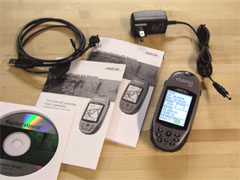
What You Get:
- eXplorist 500 GPS receiver
- User manual
- USB cable
- Rechargable Lithium-ion battery
- AC power cable
- User manual on CD-ROM
Optional accessories:
- Bike mounting bracket
- Swivel mounting bracket
- Vehicle mounting bracket
- Carrying case
- MapSend software
- SD memory card
What It Does:
The eXplorist 500 has four different navigational screens: Satellite, Map, Position, and Compass. Pressing the Nav button allows you to cycle through the navigation screens.
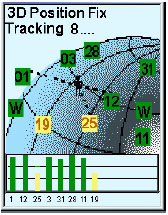
The Satellite screen shows the relative position of tracked satllites. A bar chart shows yellow for tracked satellites and green for satellites with a lock. Height of the bar indicates signal strength.
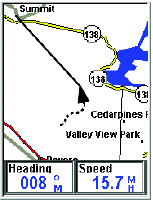
The Map screen shows your current location using a map of the region as the background. You can zoom in or out using the zoom in/out buttons to show the map at whatever scale you wish, from 100 feet to 1700 miles. The Map screen also displays an indication of where you have been as a dashed line (track history), along with an icon representing your position along a route. The Map screen is customizable.
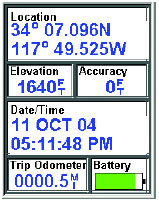
The Position screen shows your current location using whichever of the 12 coordinate systems you chose in Preferences. Also shown is the unit’s accuracy, elevation, date and time, battery life, and trip odometer.
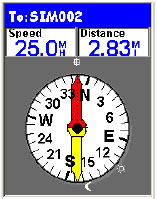
The Compass screen uses a graphical compass to give you information used to navigate to your destination. An icon outside the compass ring points to your destination and the compass points in the direction you are heading. Also displayed are the positions of the sun and moon.
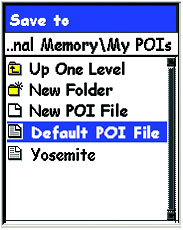
The eXplorist 500 stores data (POIs, routes, track logs, etc.) as ASCII text files to either an SD card or to its internal memory. Files saved internally or to an SD card can be opened and viewed on a personal computer providing you added flexibility in modifying and storing data to be used in the eXplorist.
Whenever you save a POI, route or track log or if you are creating a GOTO or a multileg route, you need to tell the eXplorist where you want the file saved or retrieved from. This is done through the internal browser in the eXplorist.
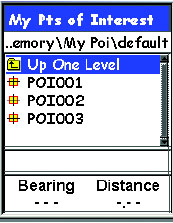
Shown at left is a sample of the My POIs folder. The first item, Up One Level, is used to move around the file hierarchy. The second item, New Folder, provides you the tool to add a new folder at this level. New POI File is used to create a new ASCII text file to save your POIs to. In the sample shown here, Yosemite is a new POI file that was created for this sample to save POIs created while hiking through Yosemite National Park. The last item, Default POI File, is the default ASCII text file where POIs you save are stored.
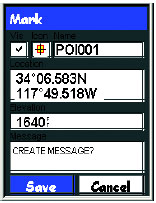
The eXplorist receiver comes with preloaded POIs for a variety of areas. You can, of course, add your own POIs to the database. Some examples of POI�s you might want to save would be your campsite, a special landmark that you want to visit again at a future date, fishing hotspots, even your car to help you find it when your day is done. Anytime you think you might want to come back to your current location, you should save it to your POI database and then it will be available the next time you want to return.
You can use the eXplorist receiver to go to (�GOTO�) any destination in the POI database. This can be one of the POIs that was preloaded in receiver, a geocaching point or a POI that you have saved. Once a GOTO route has been defined, the unit will guide you in a straight line to your destination. If you need to move away from the suggested path, the eXplorist receiver will continuously update the route, keeping you headed towards your destination.
The eXplorist receiver records your track and allows you to use this information to create a route, backtrack or just to provide you with a visual indication of your journeys. Active Track is the track that is presently being created by your eXplorist receiver. In Active Track, you have the following options: Stop Logging, Resume Logging, New Track, Save, BackTrack, Clear Track, Convert to Route, and View on Map.
When an Active Track is saved it becomes one of the stored Track Logs. With Track Logs you have the following options: Follow Track, Reverse Track, Delete Track, Copy Track, Move Track, Convert to Route, and View on Map.
The Route function has the following options: Activate/Deactivate Route, Edit Route, Reverse Route, Delete Route, Move Route, and View on Map.
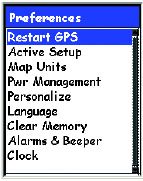
Preferences allows you to do the following:
- Restart GPS – If you travel over 500 miles with your eXplorist receiver turned off, restarting allows faster position computation.
- Active Setup – Allows access to a preferred folder when saving POIs, routes, geocache points, or the maps.
- Changing Map Units – Allows adjustment of Nav Units, North Reference, Coordinate System and Map Datum.
- Setting Power Management – Options used to help preserve battery life in the eXplorist receiver.
- Personalizing – You can add your name and address information to the unit.
- Changing Languages – Choose from 10 different languages.
- Clearing Memory – Track History, Reset Default, and All
- Setting Alarms & Beeper – The eXplorist has 5 audible alerts: Anchor Alarm, Arrival Alarm, Off Course Alarm, GPS Fix, and Proximity Alarm.
- Setting the Clock – Change time format (AM/PM or 24 hour) and adjust Daylight Saving Time.
Advanced features are:
- Area Calculation
- Fishing Hunting Times
- Sun/Moon Rise/Set Times
- Vertical Profile
- Simulate – simulates traveling a route
- Communications – manages data and power communication with the eXplorist
Specifications:
Physical:
Size: 4.6″H x 2.1″W x 1.3″D (117 x 53 x 33 mm)
Weight: 5.7 oz. (161 g)
Display: 1.4″ x 1.8″ (36 x 46 mm)
Display Resolution: 160 x 120 pixels
Antenna: Patch
Construction: Rubber Armored Impact Resistant Plastic waterproof to one meter for 30 minutes
Temperature Range: 14F to 140F (-10C to 60C)
Performance:
Receiver: 14 Parallel Channel, WAAS/EGNOS Enabled
Acquisition time: less than 2 minutes-cold start
less than 1 minute – warm start
less than 15 seconds – hot start
Update Rate: 1 second continuous
Position Accuracy: less than 7 meters, horizontal
less than 3 meters, horizontal w/ WAAS or EGNOS
10 meters, vertical
Navigation:
Waypoints: 500
Trackpoints: 2000
Routes: 20
Power:
Input: Lithium-Ion Battery
Battery Life: Up to 17 hours
Price:
Suggested Retail: $449.95 USD
Mean Price Available on Internet: $348.00 USD
Practical Use:
Before use, the lithium-ion battery needs to be inserted and charged for 4 hours. The battery fits into place snugly and the cover screws on. This seems to be a more secure system than the Magellan’s Meridian series. The USB cable attaches in a similar manner as other Magellan handhelds but it is a different cable.
The USB cable can be used to charge and power the eXplorist 500. Connect it one direction for charging and the other direction for power by the computer. A nice feature is an on-screen indicator showing when it is connected to external power.
The SD card is inserted by attaching it onto a hinged port then snapping it into place. The pivoting port seems very light duty and is a concern. But it is not normal that one would need to plug and unplug an SD card often. There are 8 buttons on the face of the unit and 2 on the sides. One of the side buttons is the power and it’s placement makes it difficult to accidently turn the unit on or off. One of the buttons on the front is similar to Garmin’s “click stick.” Magellan calls it a “joystick.” In addition to moving up, down, left, and right, it also pushes in making navigating the screens convenient.
The eXplorist 500 allows the owner to enter her or his name, address, and phone number. This is a good security feature, however it is unlikely that a person not familiar with the unit would know how to access that information if stolen or lost.
I used this unit for geocaching and it brought me within 10 feet of the cache, as expected. The geocaching feature of the eXplorist 500 doesn’t appear to be all that useful. It doesn’t show enough information about the cache to be a stand-alone geocaching device. Another problem with this feature is you cannot edit or delete individual caches from the database. The time to acquire a signal lock seemed a little longer than other models but not long enough to be too much of an inconvenience.
Cons and Pros:
Cons:
- Unit needs to be held a certain way in some sunlight conditions
- Limited number of navigation screens
- Does not come with a wrist strap
Pros:
- High-resolution color display
- Good position accuracy
- PC-type file system
Conclusion:
The Magellan eXplorist 500 has quite a few features – some are useful (such as the file system) and some are marginally useful (such as the geocaching feature). Performance was good. Ease of use was average. For someone with GPS usage experience, the file system is nice but the lack of customizable navigation screens would be frustrating. The first time buyer needs to weigh which features she or he wants in a GPS to justify this mid-to-somewhat-high priced device.
NOTE: (Added 01-17-06) I got an email from an eXplorist user that he used his unit in temperatures below -10 degrees C/14 F and it failed. Yes, the temperature was below what the specs say, but be advised if you want to use it below this temperature it will most likely fail.